설정 여는 방법
모바일에서 Settings 는 하단 바가 아닌 메일 목록 상단에서 접근합니다:
- 메시지 목록의 오른쪽 상단에 있는 3-점 메뉴를 탭한 다음 Settings 를 탭 — 아이콘이 기어 모양인 항목입니다. 상단 왼쪽의 계정 이름을 탭하여 계정 선택기를 열고 거기에서 Settings 를 선택할 수도 있습니다. Opening Settings를 참조하세요.
- Global Settings 를 탭합니다.
이 헬프 센터의 다른 곳에서도 경로가 Settings | Global Settings | … 로 보일 텐데 — 위의 1단계가 바로 이 경로들이 시작하는 Settings 에 도달하는 방법입니다. 설정을 더 여는 방법과 그 화면에서 무엇이 있는지에 대해서는 How to Open Settings in BlueMail를 참조하세요.
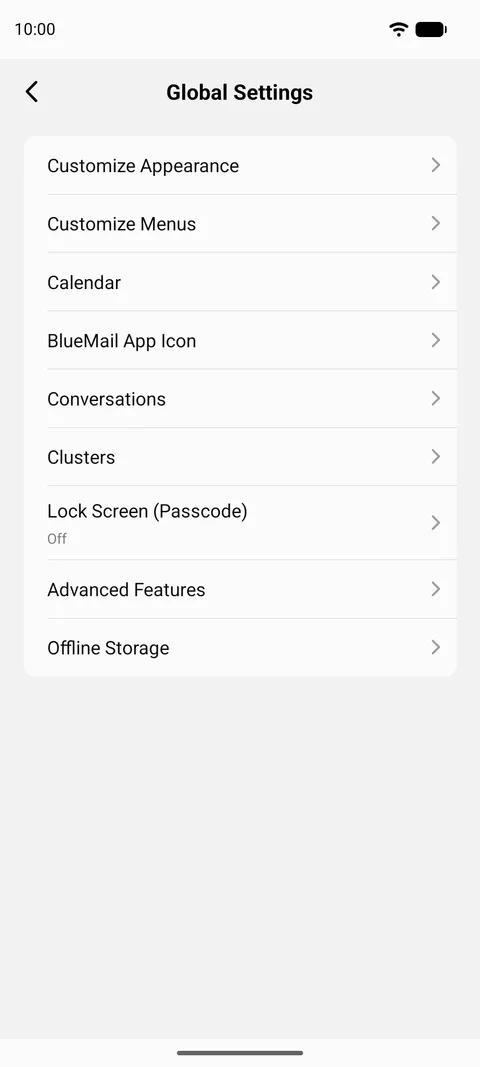
일단 거기에 도착하면, Global Settings 는 이 모든 앱 전체에 걸친 옵션들을 제공합니다:
- Customize Appearance — Dark Mode, Theme Color, and Text/Font Size.
- Customize Menus — 편집 your Swipe Actions 및 Bottom Bar Actions.
- Calendar
- BlueMail App Icon — 포함된 App Icon Counter Badge.
- Conversations — 관련 이메일을 스레드로 그룹화.
- Clusters — 비슷한 이메일을 함께 그룹화.
- Lock Screen (Passcode)
- Advanced Features — 여기에서 가장 긴 화면으로, 앱 기본값, 작성 및 전송 옵션, 공유, 위젯 및 알림을 다룹니다: Change Language, Display Prev/Next Mail View Action Buttons, Show after Deleting a Message, Enable Interactions, 및 약 30여 가지 더.
- Offline Storage — 기기가 보관할 메일의 일수. 이 항목은 앱 설정 방식에 따라 이름이 지어졌습니다: 오프라인 저장이 해제된 경우에는 Sync 로 읽고, 두 경우 모두 동일한 설정으로 연결됩니다.