
Dacă emailurile se deschid cu un corp gol — adesea imediat după o actualizare Android sau a unei aplicații — motivul obișnuit este Android System WebView al dispozitivului tău, componenta Android pe care aplicațiile o folosesc pentru a afișa conținut web, rulând o versiune Beta sau personalizată. Trecerea înapoi la versiunea stabilă rezolvă problema.
Toate pașii de mai jos sunt setări ale sistemului Android, nu BlueMail-setări.
Verifică dacă este instalat un WebView Beta
Deschide Setări ale dispozitivului tău, mergi la Aplicații și caută WebView. Dacă este instalat Android System WebView Beta (sau o versiune Dev/Canary), aceasta este probabil cauza.
Revino la WebView stabil
Ce versiune a WebView folosește Androidul este aleasă în Opțiuni pentru dezvoltatori din Android:
- Dacă Opțiunile pentru dezvoltatori nu sunt activate încă: deschide Setări, mergi la Despre telefon, și atinge Număr de versiune de șapte ori.
- Mergi la Setări, apoi Sistem, apoi Opțiuni pentru dezvoltatori, și atinge Implementare WebView. Pe unele dispozitive, Opțiunile pentru dezvoltatori se află direct sub Setări.
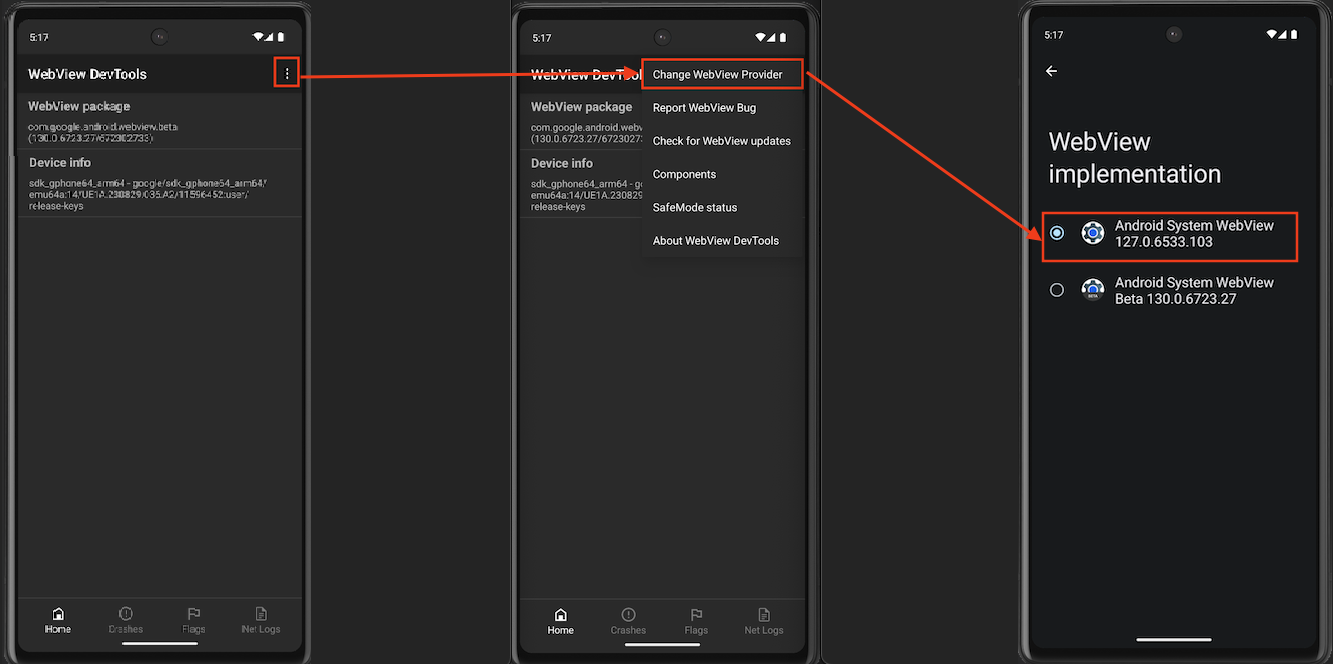
- Alege WebView stabilă Android System WebView — intrarea fără Beta în numele său, ca în ecranul din ultimul pas de mai jos.
Dacă dispozitivul tău are aplicația WebView DevTools, poți ajunge la același selector din acea aplicație — aceasta este ruta pe care o arată captura de ecran: apasă meniul cu trei puncte din colțul din dreapta sus, alege Schimbă furnizorul WebView, și selectează stabilă Android System WebView pe ecranul Implementare WebView.
Sau elimină Beta în loc
Dacă ai instalat Android System WebView Beta din Play Store, dezinstalarea acesteia funcționează și ea: deschide Play Store, găsește Android System WebView Beta, și atinge Dezinstalare. Dispozitivul tău redevine utilizatorul WebView stabil.
După comutare, închide pe deplin și redeschide BlueMail. Dacă emailurile tot se deschid goale, trimite un email la support@bluemail.me cu modelul dispozitivului tău și versiunea Android.
