
Jos sähköpostit avautuvat tyhjällä rungolla — usein heti Androidin tai sovelluspäivityksen jälkeen — tavallinen syy on laitteen Android System WebView, Android-komponentti, jota sovellukset käyttävät web-sisällön näyttämiseen, suorittamassa Beeta- tai mukautettua rakennetta. Siirtyminen vakaaseen versioon ratkaisee sen.
Kaikki alla olevat askeleet ovat Androidin järjestelmäasetuksia, eivät BlueMail-asettuksia.
Tarkista, onko WebView Beta asennettuna
Avaa laitteen Asetukset, siirry kohtaan Sovellukset, ja etsi WebView. Jos on asennettuna Android System WebView Beta (tai Dev/Canary-rakenne), se on todennäköinen syy.
Vaihda takaisin vakaaseen WebViewiin
Mikä WebView-rakenne Android käyttää, valitaan Androidin Kehittäjäasetuksista:
- Jos Kehittäjäasetukset eivät ole vielä käytössä: avaa Asetukset, siirry Puhelimen tiedot -kohtaan ja napauta Koota numero seitsemän kertaa.
- Siirry Asetukset, sitten Järjestelmä, ja Kehittäjäasetukset, ja napauta WebView-toteutus. Joillakin laitteilla Kehittäjäasetukset ovat suoraan Asetusten alla.
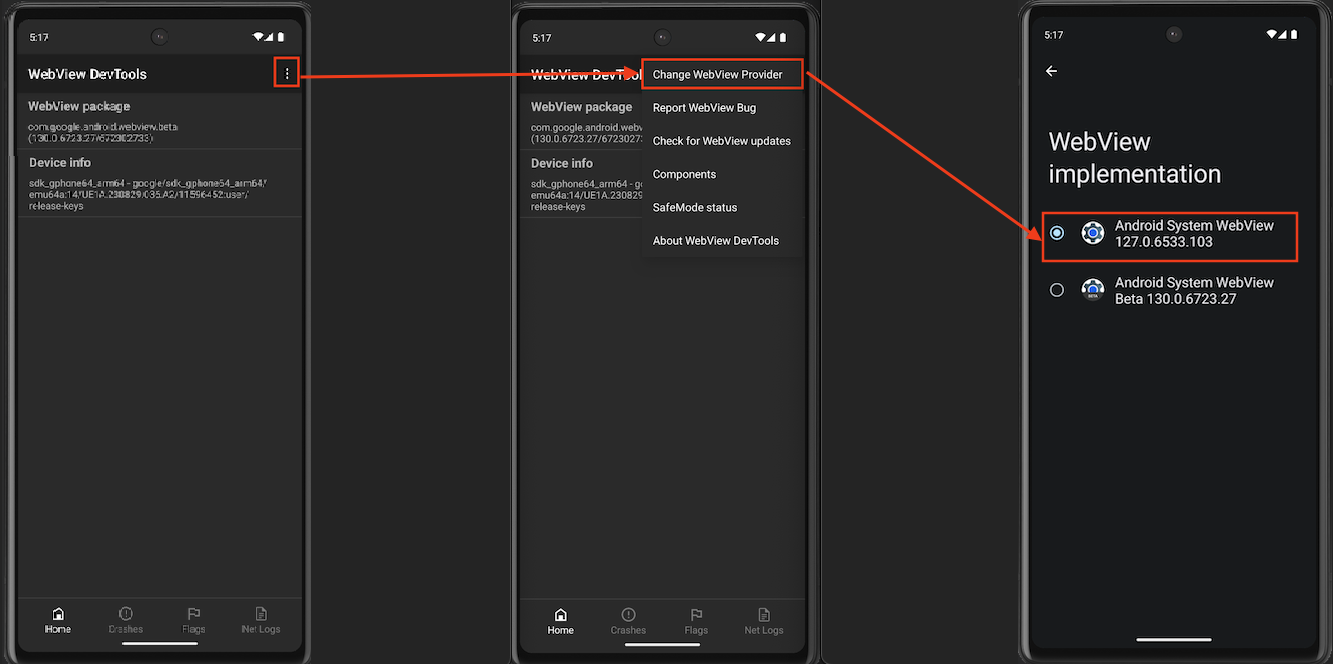
- Valitse vakaana Android System WebView — sen nimen Beeta ei sisällä, kuten viimeisen kuvan alareunassa.
Jos laitteessasi on WebView DevTools -sovellus, voit päästä samaan valitsimeen myös sieltä — tämä on se reitti, jonka kuvakaappaus näyttää: napauta oikeassa yläkulmassa olevaa kolmen pisteen valikkoa, valitse Vaihda WebView-palveluntarjoaja ja valitse vakaa Android System WebView WebView-toteutus -näkymässä.
Tai poista Beta kokonaan
Jos asensit Android System WebView Beta:n Play Storesta, sen poisto toimii myös: avaa Play Kauppa, etsi Android System WebView Beta ja napauta Poista asennus. Laitteesi palaa käyttämään vakaata WebViewiä.
Päivittämisen jälkeen sulje kokonaan ja avaa BlueMail uudelleen. Jos sähköpostit avaavat edelleen tyhjinä, lähetä sähköpostia osoitteeseen support@bluemail.me laitteenmalliasi ja Android-versiotasi varten.
