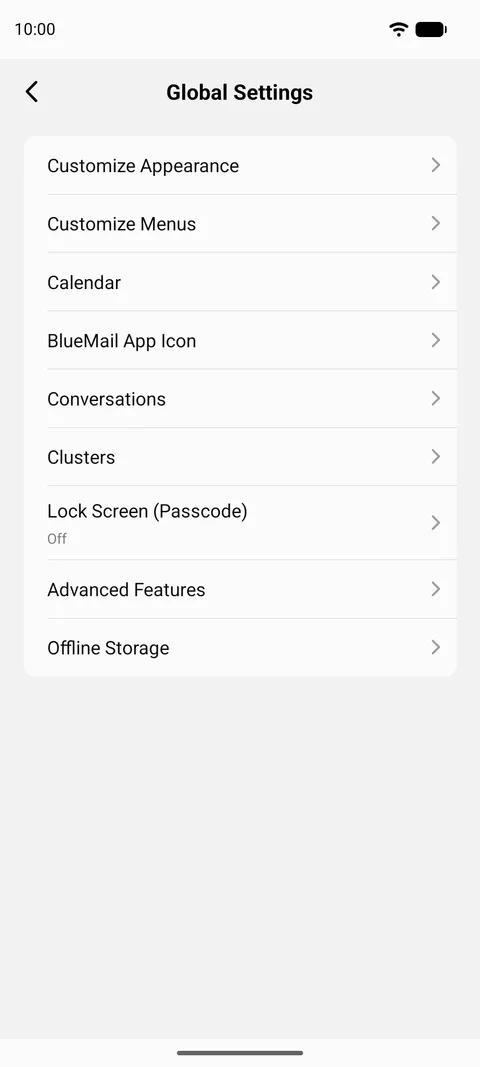
設定を開く方法
モバイルでは、設定 は下部バーではなくメール一覧の上部からアクセスします:
- メッセージ一覧の右上にある 3点メニュー をタップし、次に 設定 をタップします — 歯車アイコンの付いた項目です。左上のアカウント名をタップして アカウントピッカー を開き、そこから 設定 を選択することもできます。参照: 設定を開く.
- グローバル設定 をタップします。
このヘルプセンターの他の箇所では、パスが 設定 | グローバル設定 | … のように書かれているのを目にします — 上のステップ1は、これらのパスが始まる 設定 に到達する方法です。設定を開く他の方法や、その画面に何があるかの詳細は How to Open Settings in BlueMail にあります。
そこに到達すると、グローバル設定 にはアプリ全体に関する次のオプションがあります:
- 外観のカスタマイズ — ダークモード、テーマカラー、および テキスト/フォントサイズ。
- メニューのカスタマイズ — スワイプアクション と 下部バーアクション を編集します。
- カレンダー
- BlueMail アプリアイコン — アプリアイコンのバッジカウンター を含みます。
- 会話表示 — 関連するメールをスレッドにまとめます。
- Clusters — 類似のメールをまとめます。
- ロック画面(パスコード)
- 高度な機能 — ここで最も長い画面で、アプリのデフォルト、作成と送信のオプション、共有、ウィジェットや通知を網羅します: 言語の変更、前/次のメール表示アクションボタンを表示、メッセージ削除後に表示、対話を有効にする、およびさらに約30項目。
- オフラインストレージ — デバイスに保持するメールの日数。この項目の名前はアプリの設定によって変わります: オフラインストレージがオフのときは 同期 と表示され、いずれの場合も同じ設定に移動します。