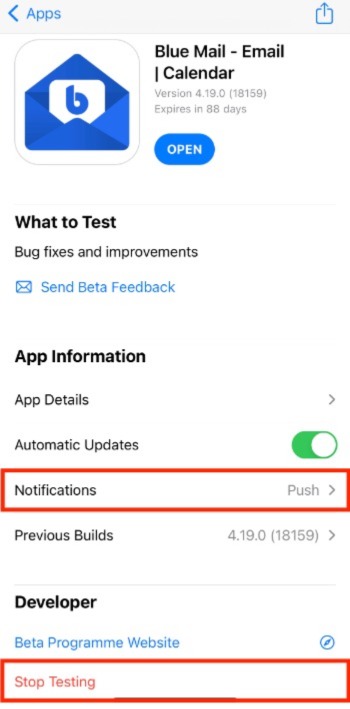
Wenn Sie TestFlight verwenden, um unser Team beim Beta-Test von BlueMail auf iOS zu unterstützen, können Sie steuern, wie die App Sie bezüglich Updates kontaktieren soll.
Um Push- oder E-Mail-Benachrichtigungen auszuschalten:
- Öffnen Sie die TestFlight-App.
- Tippen Sie auf BlueMail (nicht auf die OPEN-Schaltfläche), oder auf die App, die Sie testen.
- Scrollen Sie nach unten zu Benachrichtigungen → Push, E-Mail und tippen Sie auf Push-Benachrichtigungen und/oder E-Mail-Benachrichtigungen, um sie ein- oder auszuschalten.
Abschließend: Wenn Sie das Beta-Testen vollständig beenden möchten, scrollen Sie nach unten zum Ende und tippen Sie auf Stop Testing.