How to open Settings
On mobile, Settings is reached from the top of the mail list, not from the bottom bar:
- Tap the 3-dot menu at the top-right of your message list, then tap Settings — it is the entry with the gear icon. You can also tap your account name at the top-left to open the account picker and choose Settings from there. See Opening Settings.
- Tap Global Settings.
Elsewhere in this help center you will see paths written as Settings | Global Settings | … — step 1 above is how you reach the Settings those paths start from. More ways to open Settings, and what else is on that screen, are in How to Open Settings in BlueMail.
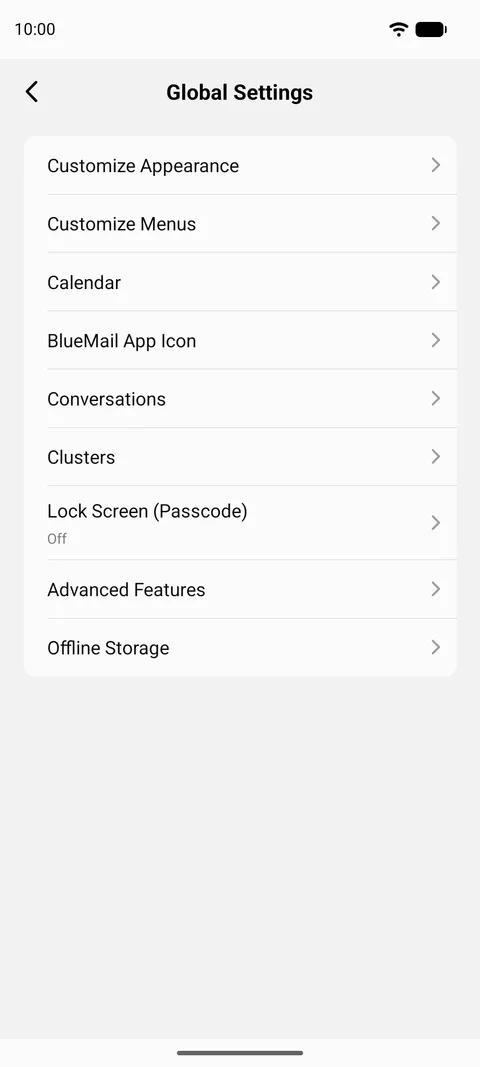
Once you are there, Global Settings gives you these app-wide options:
- Customize Appearance — Dark Mode, Theme Color, and Text/Font Size.
- Customize Menus — edit your Swipe Actions and Bottom Bar Actions.
- Calendar
- BlueMail App Icon — including the App Icon Counter Badge.
- Conversations — group related emails into threads.
- Clusters — group similar emails together.
- Lock Screen (Passcode)
- Advanced Features — the longest screen here, covering app defaults, compose and sending options, sharing, widgets and notifications: Change Language, Display Prev/Next Mail View Action Buttons, Show after Deleting a Message, Enable Interactions, and around thirty more.
- Offline Storage — how many days of mail to keep on the device. This entry is named for how your app is set up: it reads Sync where offline storage is switched off, and leads to the same settings either way.